
Your company publishes a useful guide. You want customers to find it on Google, ask ChatGPT about it and follow a link to your website. But you may not want that same guide used to train the next AI model.
Can you choose one without accepting the other?
Sometimes. The answer depends on the provider, the product and the control you use. Some companies separate training from search. Others bundle training with uses that also help people discover your content. A broad “block AI” setting can therefore remove opportunities you wanted to keep.
For a website owner, this is a practical part of generative engine optimisation, or GEO: understanding how your content becomes available to AI services, and deciding which uses support your business.
Provider documentation checked on 1 October 2026. Recheck the linked guidance before changing a production site.
In this guide
1. One page can serve four different purposes
Before changing a setting, separate the uses you are trying to control.
Training helps develop or improve a model. Search helps a service discover and index pages so they can be found later. Grounding supplies information while an answer is being written. User-requested retrieval happens when someone asks an assistant to open a particular page.
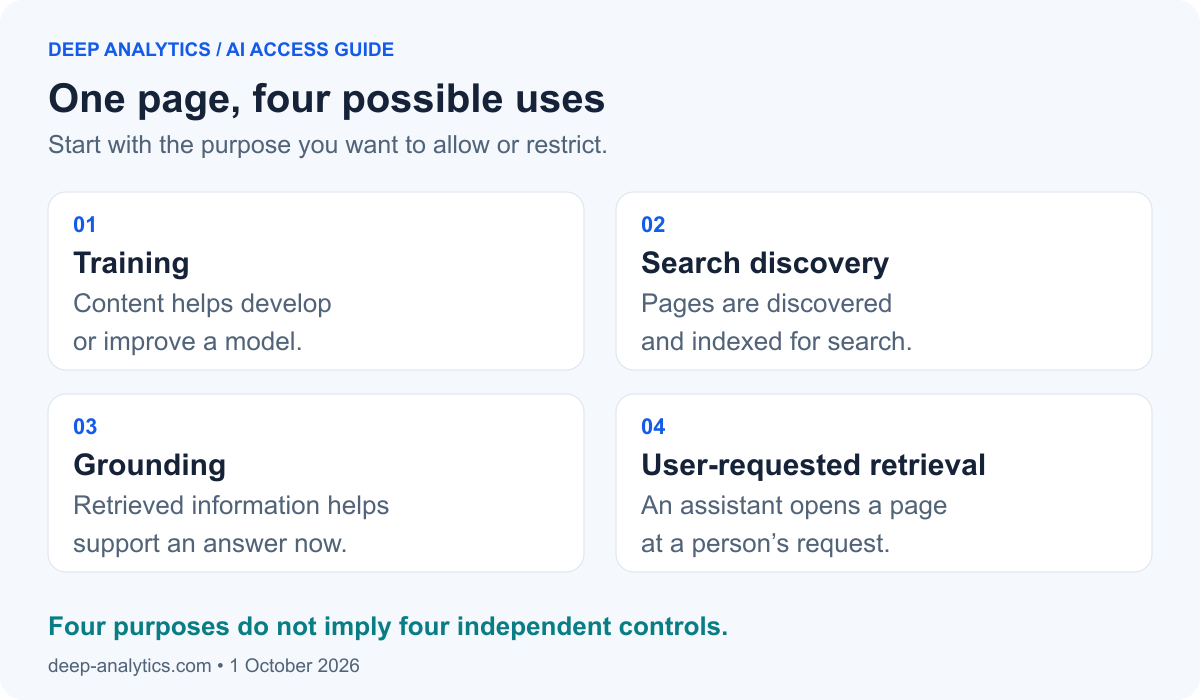
These are four purposes. They are not necessarily four separate crawlers or four independent settings.
Imagine a customer asking an assistant whether your consultancy works in Italy. The assistant might retrieve your current services page to answer. That is different from your page contributing to the earlier development of the model.
This distinction explains why “I want to block AI” is an incomplete instruction. A more useful policy is: “Keep our public pages available for search and customer enquiries; restrict supported training uses.” The remaining question is which providers let you make that choice without giving up something else.
The arrangements differ by provider. Anthropic’s crawler documentation and Google’s explanation of grounding illustrate those differences.
2. Where the controls belong
A crawler is software that requests web pages automatically. Your website can communicate instructions to it in several places, and your security service can decide whether its request gets through.
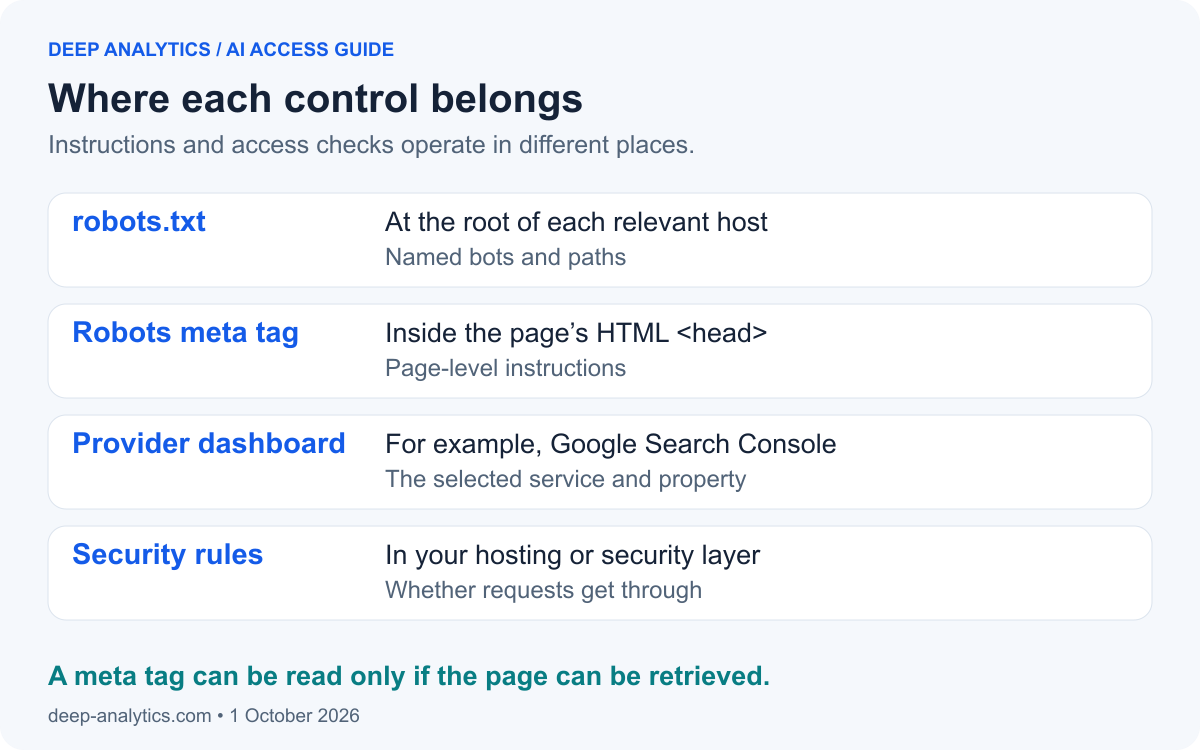
Robots.txt is a text file at the root of a website, such as https://example.com/robots.txt. Its rules address named bots and website paths. Review each relevant host: a rule on your main domain does not automatically express the same policy for every subdomain.
A robots meta tag belongs inside the page’s HTML <head>, where metadata is stored. That is different from the visible header or navigation. Pasting a tag into the article text does not configure it. A website template or an SEO setting in your content management system can generate the tag.
Dashboard settings apply within a provider’s service, such as Google Search Console. Firewall rules operate in the security layer through which requests pass. These controls need to agree with the policy you intended.
Remember: a crawler must retrieve the page to read a meta tag inside it. Blocking that request can prevent it from seeing your instruction.
Sources: robots.txt location and scope and page metadata and crawler access.
3. Compare the provider controls
Start with the services your customers use. A crawler name tells you which rule to apply; the provider's documentation tells you what that rule actually changes.
OpenAI and Anthropic: separate training and search choices
OpenAI, the company behind ChatGPT, distinguishes GPTBot for potential training collection from OAI-SearchBot for search. Their robots.txt settings are independent. Anthropic, the company behind Claude, separates ClaudeBot from Claude-SearchBot in a similar way.
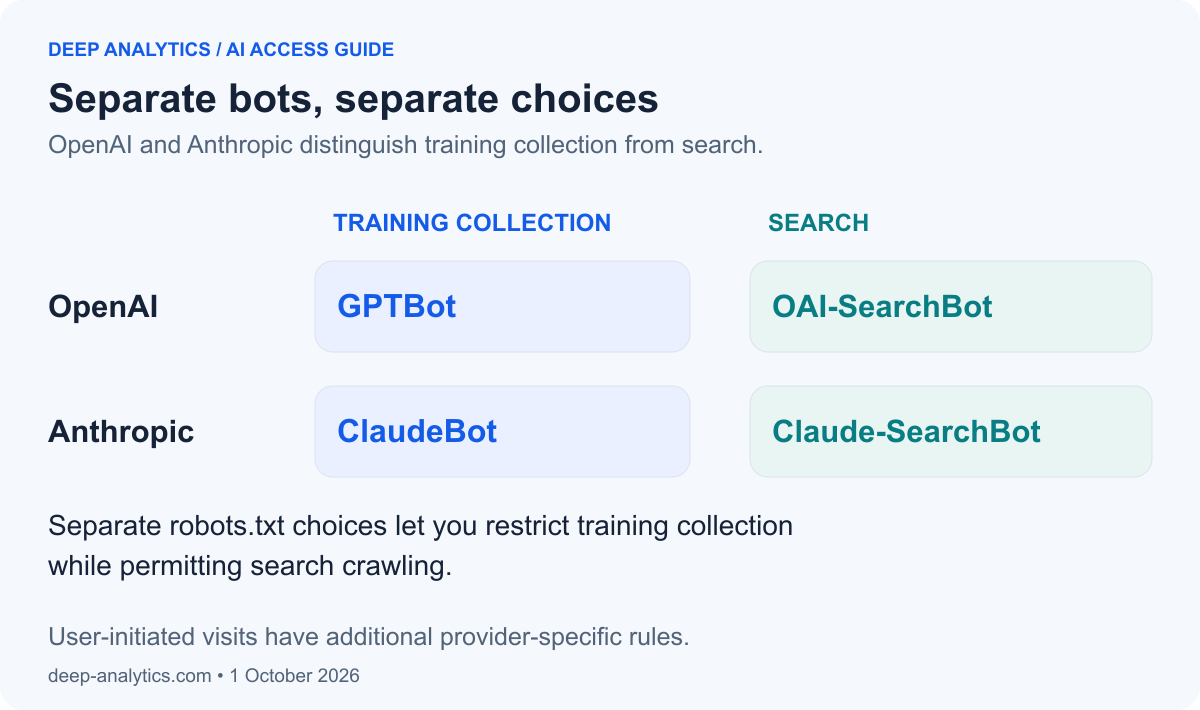
For user-requested visits, the rules differ. Anthropic says Claude-User respects robots.txt. OpenAI says robots.txt may not apply to certain requests made through ChatGPT-User. Allowing a search crawler makes access possible; it does not promise a citation.
Sources: OpenAI's crawler documentation and Anthropic's crawler documentation.
Other providers to include in your audit
- Perplexity:
PerplexityBotsupports search and is not used to collect content for foundation-model training.Perplexity-Userretrieves pages for users and generally ignores robots.txt. Check both crawler access and your firewall settings. See Perplexity's crawler guidance. - Apple:
Applebotsupports search.Applebot-Extendedis a training control in robots.txt, not a separate crawler; disallowing it preserves search eligibility. Apple'snosnippetcontrol also restricts use in AI answers, so treat that as a separate visibility decision. See Apple's documentation. - Amazon:
Amzn-SearchBotsupports search without collecting training content;Amzn-Userretrieves information for users and may not follow every robots.txt directive.Amazonbothas broader product-improvement uses that may include training. Amazon also documents page-levelnoarchiveas a training restriction. See Amazon's crawler guidance. - Meta:
Meta-WebIndexersupports Meta AI search.Meta-ExternalAgentcovers training and direct indexing, so blocking it affects both documented uses.Meta-ExternalFetcherhandles user requests and other agent-related functions and may bypass robots.txt. See Meta's crawler documentation. - Common Crawl:
CCBotcollects an open web dataset that others can reuse. Restricting it addresses collection into that dataset, not a training-only service or a universal downstream opt-out. Review Common Crawl's dataset overview and crawler identification guidance.
Google and Microsoft need closer attention because their controls involve additional trade-offs. They are covered in the next two sections.
An annotated robots.txt example to adapt
This excerpt illustrates separate training restrictions for OpenAI, Anthropic and Apple, while permitting named search crawlers to access public pages. Adapt it to your existing configuration. It is not a replacement for your site's complete robots.txt.
# Training restrictions for these three providers
User-agent: GPTBot
User-agent: ClaudeBot
User-agent: Applebot-Extended
Disallow: /

# Search crawlers: public pages remain crawlable
# /admin/ is an EXAMPLE path: retain your real restrictions.
User-agent: OAI-SearchBot
User-agent: Claude-SearchBot
User-agent: PerplexityBot
User-agent: Amzn-SearchBot
User-agent: Meta-WebIndexer
User-agent: Googlebot
User-agent: Bingbot
User-agent: Applebot
Disallow: /admin/

# Default group for bots without a more specific group
# Retain every applicable rule from your existing file.
User-agent: *
Disallow: /admin/
User-agent identifies the crawler or control token. Several names can share one group. Disallow: / applies to all paths; /admin/ applies only to that example directory. Other paths remain allowed under the rules shown.
Named groups do not inherit the wildcard group's restrictions. Merge existing rules carefully and repeat relevant path restrictions in each named group. User-requested fetchers are left under the default group here; their providers' exceptions still apply. The Robots Exclusion Protocol explains group matching.
The example deliberately leaves Google-Extended, Amazonbot, Meta-ExternalAgent and CCBot as separate policy decisions. It also does not express Microsoft's training restriction. Read their implications before adding rules. Private content still requires authentication; robots.txt is publicly readable and is not a security barrier.
4. Google requires three checks
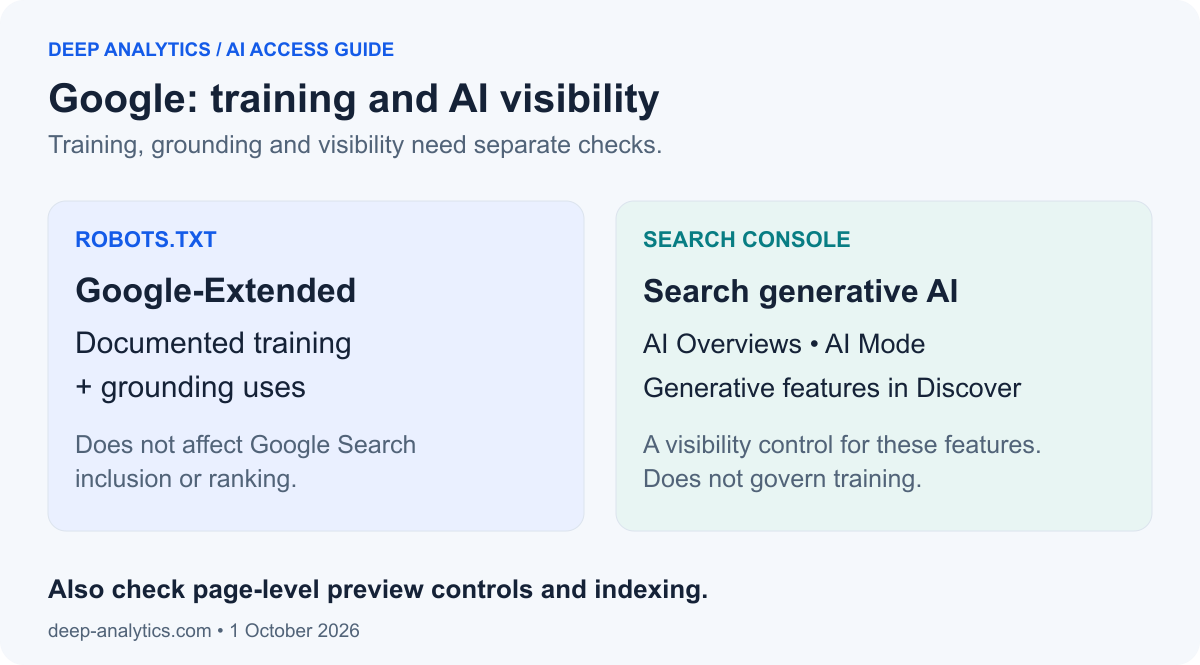
Google's controls operate at different levels: permitted model uses, inclusion in AI search features, and what individual pages can show. Check all three before concluding that a site is configured correctly.
Check 1: Google-Extended covers training and some grounding
Google-Extended is a control token in robots.txt, not a separate HTTP crawler name to find in server logs. Its documented scope includes Gemini training and grounding in Gemini Apps and Vertex AI, Google's platform for building AI applications. Blocking it also restricts those grounding uses; it does not affect Google Search inclusion or ranking.
Calling it a training-only switch would hide that compromise. See Google's crawler documentation.
Check 2: Search Console controls AI search inclusion
Search Console is Google's tool for website owners. Under Settings → Search generative AI, owners can manage inclusion in AI Overviews, AI Mode and generative features in Discover. Google says this control became available worldwide on 31 August 2026.
Excluding a property removes its content and links from those features without changing inclusion or ranking in other parts of Search. Check whether it inherits a parent property's choice. This setting does not control training: Google's help page directs owners to Google-Extended for training restrictions on models used in these features. See the Search Console guidance.
Check 3: page-level previews and indexing
Googlebot's crawl access and page instructions still matter. The controls below have different effects:
data-nosnippetexcludes selected passages from snippets; apply it to a<span>,<div>or<section>around the relevant text.max-snippetlimits the text available for previews. It is not a general training opt-out or a guarantee that an AI feature disappears.nosnippetprevents text snippets and restricts direct use as input for AI Overviews and AI Mode.noindexremoves the page from Google Search once processed. It sacrifices search visibility and should not be used merely to restrict training.
Page-wide robots meta tags belong in the HTML <head>. Blocking Googlebot in robots.txt can prevent it from seeing them. These choices can affect ordinary search presentation too. Sources: Google's AI-feature guidance and robots metadata specifications.
5. Microsoft tags come with a visibility trade-off
Bing is Microsoft's search engine, and its index helps power Copilot experiences. Microsoft's original explanation dates from the Bing Chat era in 2023; its current Bing help page describes the controls for Chat and Copilot.
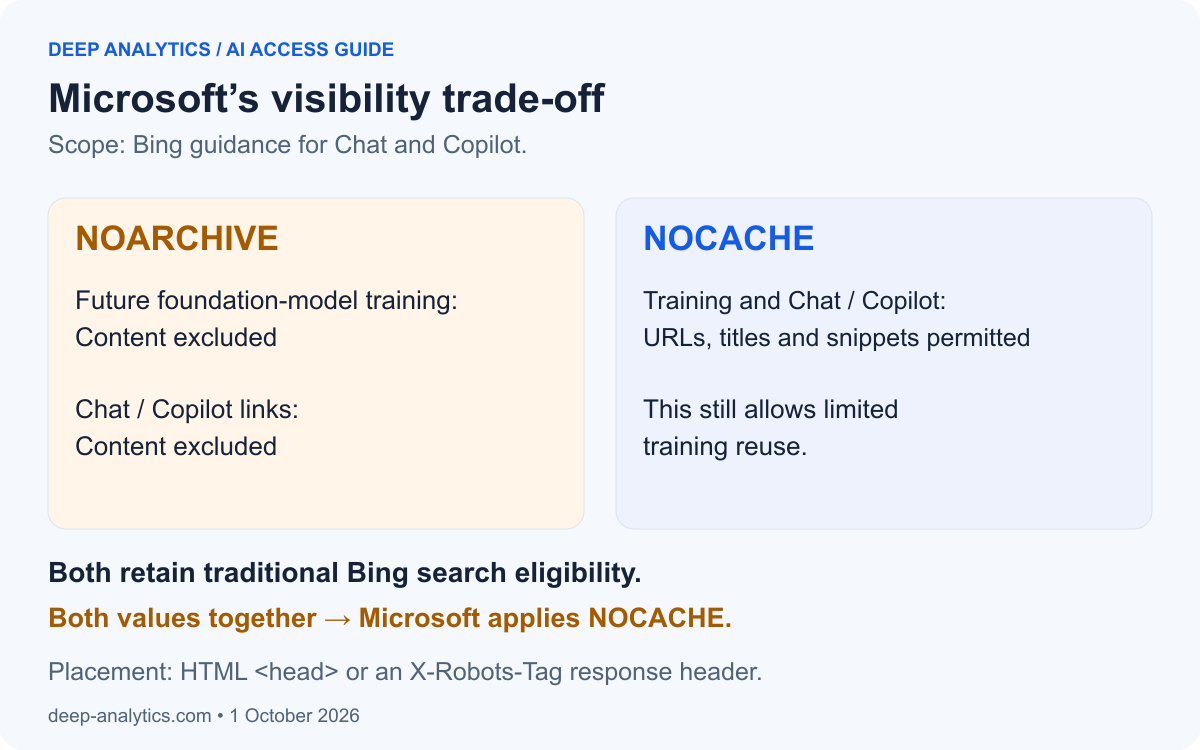
To request the NOARCHIVE policy for Bing, place this tag inside the affected page's HTML <head>:
<meta name="bingbot" content="noarchive">This restricts foundation-model training and sacrifices Chat/Copilot links. The 2023 announcement also explains exclusion from answers while retaining traditional Bing search eligibility.
The alternative is:
<meta name="bingbot" content="nocache">NOCACHE permits URLs, titles and snippets in Chat/Copilot and training. It is not a complete training opt-out. If both values are present, Microsoft applies NOCACHE.
For PDFs and other files: use a response header
A PDF has no HTML <head>. Configure the web server or CDN to send an HTTP response header with the file, for example:
X-Robots-Tag: bingbot: noarchiveThis is response metadata, not a line to paste into the PDF or robots.txt. Bing supports its robots directives through X-Robots-Tag; inspect the delivered header after configuring it. Microsoft's header guidance for non-HTML content explains the placement.
For HTML, name="robots" applies the instruction more broadly; name="bingbot" scopes it to Bing. Check other providers' interpretations before broadening it. Use the CMS or template that generates the affected pages, and choose one policy deliberately. NOCACHE here is different from the HTTP Cache-Control header used for browser and CDN caching.
6. Cloudflare can stop a crawler before it reaches your page
Cloudflare provides website performance and security services. For traffic proxied through its network, it sits between a visitor or crawler and the server hosting your site. It can serve cached content and filter requests before they reach that server. How Cloudflare works
This makes it part of your search visibility setup. A permissive robots.txt rule is of little practical help if a firewall returns a block or a verification screen instead of your article.
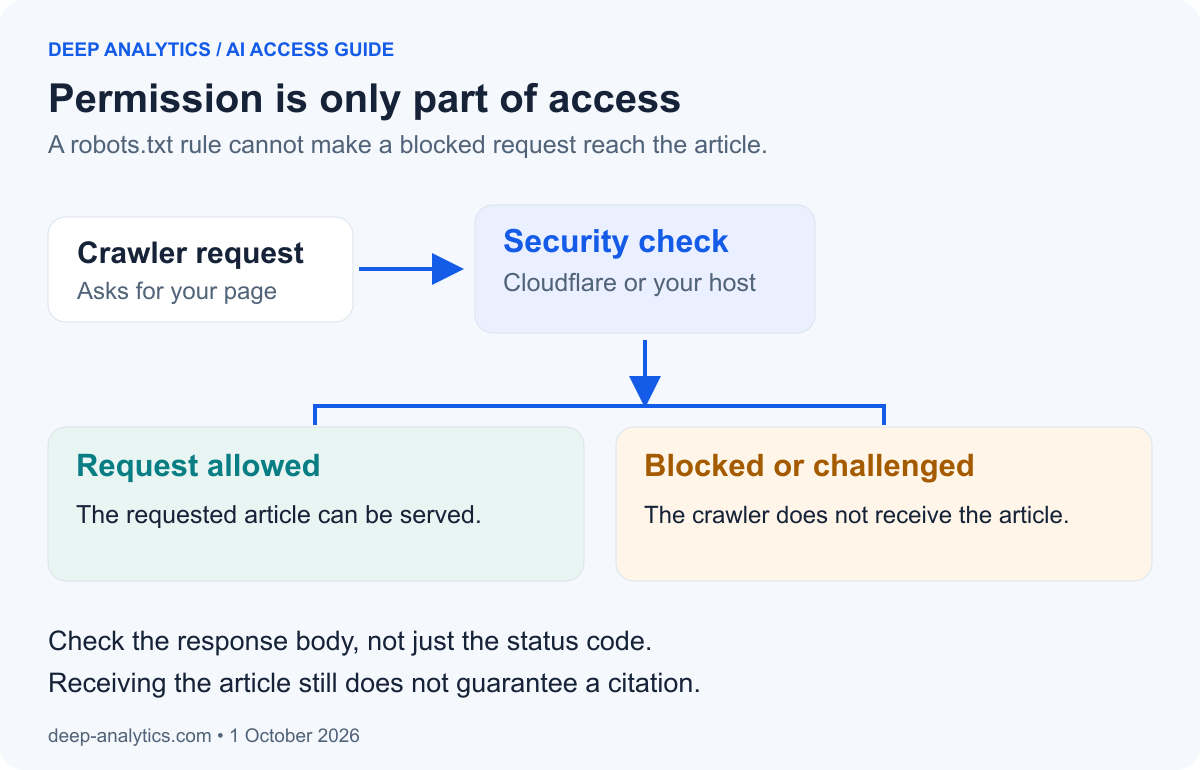
Cloudflare's September 2026 changes distinguish three controls:
- Search: crawling to build a search index.
- Training: collecting content for model development.
- Agent: visits on a user's behalf.
Under Disallow AI Training, Bot Preference Sync publishes supported training preferences in robots.txt. Qualifying mixed-use crawlers remain allowed for search; other training crawlers are actively blocked. A mixed-use crawler serves more than one purpose.
Block can also stop Googlebot, Bingbot and Applebot, affecting search access. Cloudflare is replacing older controls, and previous Training blocks migrate to Disallow AI Training. Check the resulting Agent setting too: some migrated configurations and the preset for ad-funded sites block agents on pages with ads.
Microsoft's site-level robots.txt training preference remains targeted for early 2027. Until available, Disallow AI Training does not automatically convey that preference to Bing through robots.txt; review Microsoft's page or header controls separately.
Source: Cloudflare's settings, migration tables and provider limitations.
Practical takeaway: inspect both the robots.txt actually served and the security rules. A successful HTTP status alone is insufficient: a challenge page is not the article the crawler wanted.
7. How to check what your settings actually do
Start with a business decision: which uses help customers find and evaluate your company, and which uses do you want to restrict? Then work through these five checks.
- Write down the intended policy. Record training, search, grounding and user-requested access for each provider. Note where the available controls bundle uses together.
- Find every relevant setting. Review robots.txt, page templates, provider dashboards and security rules. Include important subdomains and language editions.
- Inspect what the website serves. Check the public robots.txt file and page HTML. A setting in an editor is evidence of your intention; the delivered response shows what a crawler can receive.
- Verify real crawler access. Check server or security logs against official IP ranges or the provider’s documented DNS checks. A copied user-agent name is only a diagnostic test: any client can claim that label.
- Measure outcomes separately. Track crawl failures, indexing, sampled AI citations, referral visits and enquiries. Record when settings changed so you can investigate results without assuming that timing proves causation.
Make the access check concrete
For Perplexity, a firewall exception should match both the expected user agent and an IP in its official published ranges. Keep those ranges current and limit the exception to the intended bot access. Perplexity's firewall guidance explains the approach. OpenAI, Amazon, Apple and Common Crawl also document verification methods on the provider pages linked above.
Use reports alongside your analytics
Google provides a Generative AI performance report. Bing Webmaster Tools provides an AI Performance report covering citations across supported Microsoft and partner experiences. Read each report's scope; neither represents every AI answer or every customer interaction.
Compare those observations with referral visits and enquiries in your own analytics. Avoid treating a citation count as a click count or a change after deployment as proof of causation.
For example, a successful request shows that a page was delivered. A citation shows that a service referenced it in an observed answer. An enquiry shows a business response. Each answers a different question.
For help assessing those layers together, the Deep Analytics GEO Diagnostic covers AI search visibility and measurement. Start with the intended policy, then verify what the website actually delivers.
There are limits. Robots.txt communicates instructions to cooperating crawlers; private content needs authentication and access controls. A current opt-out also does not prove that previously collected content has been removed from an already trained model. Robots Exclusion Protocol security considerations
8. TL;DR
- Can you restrict training and keep search access? Sometimes. OpenAI and Anthropic separate crawler choices; Apple offers a separate training token. Check each provider and the uses bundled into its controls.
- Google? Review Google-Extended, Search Console’s AI inclusion setting and page-level preview controls. Removing a page with
noindexsacrifices search visibility. - NOARCHIVE or NOCACHE? Microsoft’s NOARCHIVE also sacrifices Chat/Copilot visibility. NOCACHE permits limited training reuse. Configure page metadata or an HTTP response header.
- Using Cloudflare? Disallow AI Training combines preferences with blocking. Review Search, Training and Agent settings, including migrated choices.
- What proves success? Verify delivered content, then measure visibility and business outcomes separately. Permission alone promises neither citations nor revenue.
Choose the uses you want, understand the compromises and check what your website actually delivers.